Index DB
What indexing mean ?
is a database optimization technique used for improved the speed retrieve the data from the table very fast without the need for scan the full table
Imagine it as a book if you want to find a specific topic you can go directly to the index page.
How Indexing is Work internally ?
consider we have the following table called ‘employees’
| id | name | department | salary |
| 1 | Alice | Sales | 50000 |
| 2 | Bob | IT | 60000 |
| 3 | Carol | Sales | 55000 |
| 4 | David | HR | 45000 |
if we want to fetch specific employee info we run the following DB query :
select * from employee where department='IT’
Without Index:
Database Scan the full table
iterate row by row
find match then return
O(n) → full scan
With Index
Lets create an index on ‘department’ column
CREATE INDEX idx_employee_department ON employee(department)
The database will create a separate structure like the sorted list
| Department | Row Locations |
| HR | → row 4 |
| IT | → row 2 |
| Sales | → rows 1, 3 |
Now the following is happen when we run the above query :
The database look to ‘IT’ in index
The pointer find ‘IT’ located at row 2
return all the funded rows
O(LOG N ) → tree lockup
Type of index :
Clustered Index :
1- Determine the physical order of the data on the disk2- Only one column per table
3- Usually used with primary key‘_id’Non-clustered index :
1- Separate structure with a pointer point to the data2- Multiple column on the same table
3- e.x‘idx_employee_dept’Composite Index:
1- Index on multiple column
2-CREATE INDEX idx_salary ON employee(name,department)
3- We need to make sure we follow the order column
4- Order matters: useful forWHERE department = 'X' AND salary > Y
When to use Index:
Column frequently appear on
whereclauseColumn used in
ORDER BY , GROUP BYColumn used in
JOIN
Avoid Index:
Table is very small
Frequent (INSERT , UPDATE , DELETE) operation
Column has a few unique values
Why Index slow down write operation :
Index slow down write because every write need to update all the related indexMore Index = More write
what happen internally ?
When we perform a write operation such as ‘insert’
for example
INSERT INTO EMP(name, email, userName) VALUES (..,..,..)
Without index :
1- Write row to the data page (heap / collection)
2- Done
With index :
Write row to the data page
Update index name
update index email
update index userName
Maintain tree balance
❌ More CPU + more disk I/O
5️⃣ Updates Are Worse Than Inserts
UPDATE users SET email = 'new@mail.com';
Steps:
Remove old index entry
Insert new index entry
Possibly split nodes
Update data row
👉 Update = delete + insert for indexes
Why UUID Indexes Are Slow ?
It's caused by index fragmentation, which makes writing slow. As we discussed earlier, most common databases use the B-tree algorithm for indexing.
B-trees work best when new keys arrive in a sorted order.
1 → 2 → 3 , ….
The UUID keys look like
fet123 → hrrt4223 → atre33
They are completely random, which means inserts can happen anywhere in the tree. The most important thing to note is that the size of a UUID is 16 bytes, compared to other data types like INT, which is 4 bytes.
How to Fix UUID Slowness
Use time-ordered UUIDs, like UUID version 7, where the order increases incrementally.
Interview One-Liner
“Random UUIDs are slow because they break B+Tree order, causing page splits, cache misses, and larger indexes.”
Best Practices
Index selectively: Don't index every column
Monitor performance: Use
EXPLAINto see if indexes are usedConsider composite indexes for multi-column queries
Regularly maintain indexes (rebuild, reorganize)
Index Algorithm
There is two type on indexing algorithm depend on the DB :
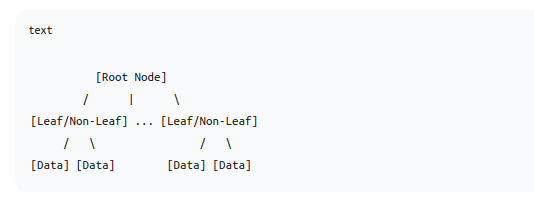
1- B-tree (Balanced tree)
The key and data can be stored in all nodes(internal , leaf node)
2- B+tree
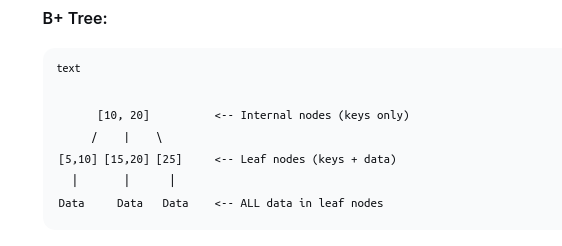
B+ Tree is an evolution of the B-Tree specifically optimized for disk-based storage systems (like databases and file systems). It's what most modern databases (MySQL, PostgreSQL, Oracle, etc.) actually use for their indexes.
Core feature:
All data is in leaf nodes
Internal nodes contain only keys (for search purposes)
Leaf nodes contain both keys and data
This design allows internal nodes to contain less data, which means more keys and more storage
Why B+ Trees Are Perfect for Databases
1. Better for Disk I/O
# Typical disk page size: 4KB-16KB
# B+ Tree node = 1 disk page
# More keys per node = fewer disk accesses
Example: With 4KB pages and 8-byte keys:
B+ Tree internal node: ~500 keys per node
3-level tree can index: 500 × 500 × 500 = 125 million records
2. Faster Range Queries
-- Find all employees with salary between 30000 and 50000
SELECT * FROM employees WHERE salary BETWEEN 30000 AND 50000;
Find first key (30000)
Follow leaf node links to 50000
No need to traverse tree repeatedly
How query planners choose indexes
The query planner is the brain of the database. It decides the best way to run a query as quickly as possible. The query planner considers many factors, such as:
Which index to use
Choosing the scan type (index scan or sequential scan)
Converting sub-queries to joins if possible for optimization
-- Before optimization: SELECT FROM users WHERE id IN (SELECT user_id FROM orders);-- After optimization (often): SELECT u.* FROM users u JOIN orders o ON u.id = o.user_id;
PostgreSQL, Oracle, MySQL all do this automatically.
How Query Planners Choose an Index (High Level)
The planner:
Generates multiple execution plans
Estimates cost of each plan
Chooses the lowest-cost plan
This is called Cost-Based Optimization (CBO).
4️⃣ Key Factors Used by the Planner
🔹 1. Query Predicate (WHERE clause)
Indexes are only useful if the query:
Filters rows
Uses indexed columns
Example:
WHERE email = 'a@b.com'
➡️ Perfect for index
Bad case:
WHERE LOWER(email) = 'a@b.com'
➡️ Index NOT used (unless functional index exists)
🔹 2. Selectivity (Most Important Factor)
Selectivity = How many rows match
| Result Size | Planner Choice |
| Very small | Index Scan |
| Medium | Index Scan / Bitmap Scan |
| Very large | Sequential Scan |
Example:
Table: 1,000,000 rows
status = 'ACTIVE'→ 90% rows → Seq Scanid = 123→ 1 row → Index Scan
🔹 3. Index Type
Different indexes for different queries:
| Index | Used For |
| B+Tree | \=, <, >, BETWEEN, ORDER BY |
| Hash | \= only |
| GIN | Arrays, JSONB, full-text |
| GiST | Geo, similarity |
| BRIN | Large ordered tables |
Planner checks index capability.
🔹 5. Statistics (VERY IMPORTANT)
Planner relies on statistics:
Row count
Distinct values
Value distribution (histograms)
Correlation
Collected via:
ANALYZE;
❗ Outdated stats = bad plans
🔹 6. Cost Estimation (CPU + I/O)
Planner estimates:
Total Cost = Disk Reads + CPU Cost + Memory Cost
Index scan = many random reads
Seq scan = fewer sequential reads
Modern SSDs may change planner decisions.
🔹 7. Sorting & ORDER BY
If index order matches:
ORDER BY created_at DESC
Planner prefers index to:
Avoid sorting
Use index order
🔹 8. LIMIT Matters
SELECT * FROM logs ORDER BY created_at DESC LIMIT 10;
Index is preferred because:
Stops early
Reads few rows
5️⃣ Types of Index Scans (PostgreSQL)
| Scan Type | When Used |
| Index Scan | Very selective |
| Bitmap Index Scan | Medium selectivity |
| Seq Scan | Low selectivity |
6️⃣ How to See Planner Decisions (PostgreSQL)
EXPLAIN ANALYZE
SELECT * FROM users WHERE email = 'a@b.com';
Shows:
Index used
Actual vs estimated rows
Cost
7️⃣ Why Planner Sometimes Ignores Your Index
Common reasons:
❌ Low selectivity
❌ Function on column
❌ Data type mismatch
❌ Outdated statistics
❌ Too many matching rows